
Knowledge & Trends
SAP BW Data Product Generator: When it’s the right choice, and when it isn’t

Blog post
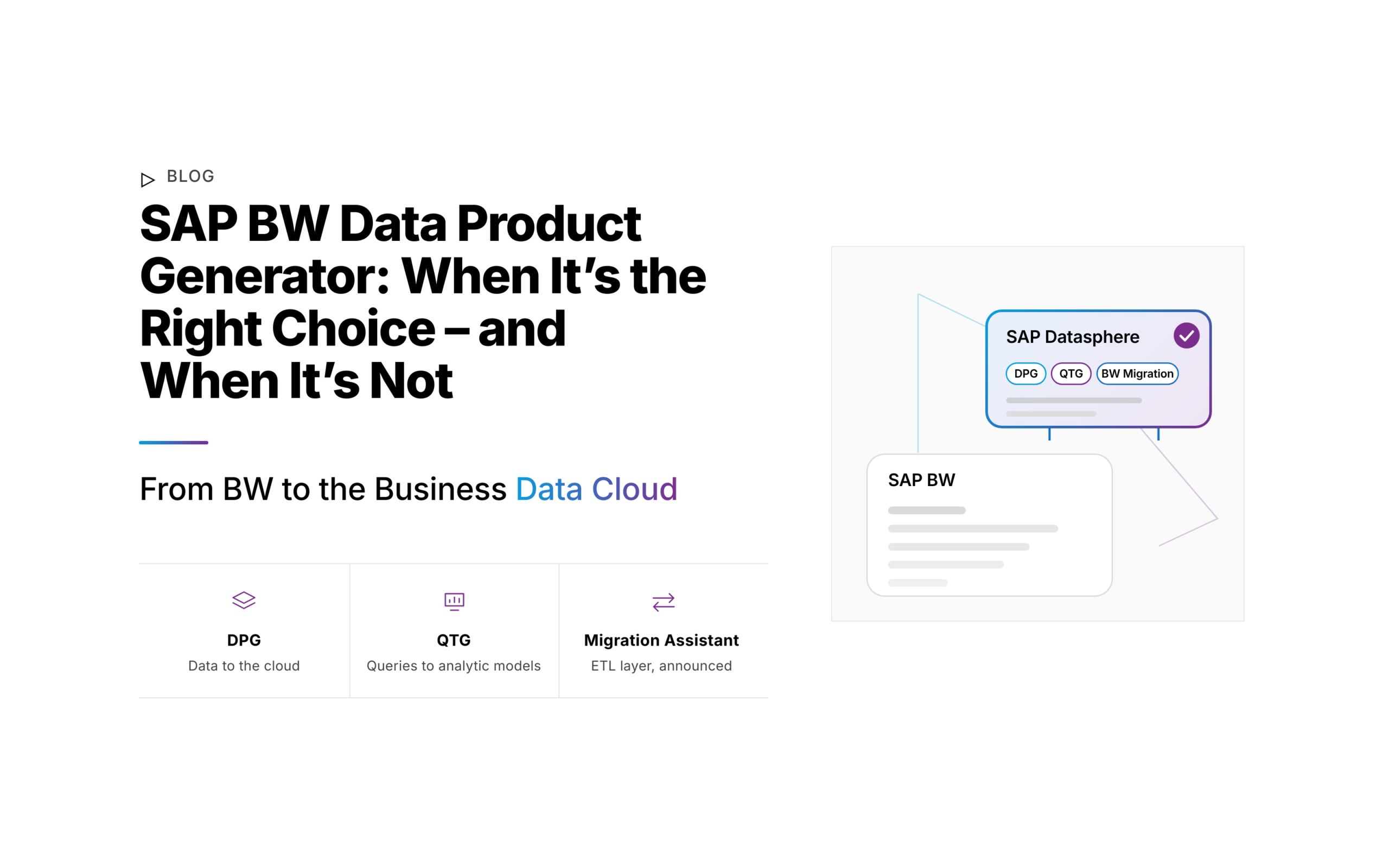
With SAP Business Data Cloud (BDC), SAP has set the direction for SAP BW: lift to Private Cloud Edition, shift the data to Business Data Cloud, innovate with data products and Intelligent Applications. For the middle step, the SAP BW Data Product Generator, or DPG for short, comes into its own.
With SAP Business Data Cloud (BDC), SAP has set the direction for SAP BW: lift to Private Cloud Edition, shift the data to Business Data Cloud, innovate with data products and Intelligent Applications. For the middle step, the SAP BW Data Product Generator, or DPG for short, comes into its own.
With the DPG, you make data from your BW InfoProviders available as data products in SAP Datasphere, directly from your BW, without touching the existing data flows. That means fast access to your BW history for analytics, planning, and AI scenarios in SAP Databricks. What the DPG doesn’t do, however, is migrate your models and your logic. This distinction is exactly what decides when it’s the right choice.
Data products from your BW, without rebuilding the data flows
The DPG runs directly in your BW system. Through a so-called data subscription, it replicates data from an InfoProvider into the object store (SAP HANA Data Lake Files) of your Datasphere tenant. This creates a local table (file) on which you build custom data products (SAP Learning). Your existing data flows and loading mechanisms in BW remain unchanged (SAP Learning).
The DPG covers more than you might expect at first glance:
▷ Broad coverage of your InfoProviders
InfoObjects, DataStore Objects (classic and advanced), InfoCubes, CompositeProviders, MultiProviders, and Query as InfoProvider serve as sources. Extraction runs through the proven ODP framework.
▷ Full, delta, and near-line storage
You choose between a one-time snapshot, a regular full load, or delta, the latter wherever the InfoProvider supports it. The DPG reads data from near-line storage directly.
▷ Integration into your BW operations
You create subscriptions in BW 7.5 using transaction RSDPS, and in BW/4HANA using the “Data Subscriptions” app in the BW/4HANA Cockpit. They are scheduled in process chains as usual. The Scenario Generator in the BW Modeling Tools also creates subscriptions for dependent objects at the same time (SAP Help). Practical tip: New data first lands in the inbound buffer and is only available in the local table (file) after the merge.
From subscription to data product
The path from your InfoProvider to a usable data product always follows the same pattern (SAP Learning):
1. Create a subscription
You select an InfoProvider, specify full or delta, and, if needed, restrict columns and records using projection and filters.
2. Activate
When you activate, the system automatically creates a local table (file) in the BW space of your Datasphere tenant.
3. Execute
Your BW pushes the data into the inbound buffer, either manually or scheduled in a process chain.
4. Merge
A merge task, run manually or via a task chain, transfers the buffered data into the delta table of the local table (file).
In the Data Sharing Cockpit in Datasphere, you create a custom data product. Using Delta Share, you share it with SAP Databricks without any further copy (SAP Community), or you release the local table to a consumption space for your own views and analytic models. The data is then queried directly in the object store (SAP Community).
The prerequisite: no shift without a lift
A key point for your planning: The DPG is not a tool for every BW. SAP provides it exclusively for BW in the Private Cloud Edition within Business Data Cloud (SAP Community).
▷ What your system needs to bring
Your BW runs on SAP HANA, at a minimum as BW 7.50 SP24, BW/4HANA 2021 SP04, or BW/4HANA 2023, in each case as Private Cloud Edition (SAP Community). You have the usage enabled for each Datasphere tenant via a support ticket (SAP Learning), and the object store must be active in the tenant. SAP describes the setup in Note 3590400; BW and Datasphere connect via OAuth 2.0.
Embedded BW, for example in SAP S/4HANA, must first be converted into a standalone BW in the Private Cloud Edition (SAP Community). If your BW still runs on a different database, the migration to SAP HANA comes first (SAP Learning).
▷ How it fits with lift, shift, innovate
The DPG is the core of the middle step in SAP’s roadmap. In the lift, you move your BW into the Private Cloud Edition, where SAP maintains BW 7.5 until the end of 2030 and BW/4HANA until 2040. In the shift, you use the DPG to make selected data usable. In the innovate step, SAP-managed data products and Intelligent Applications gradually replace your own BW flows (SAP Architecture Center).
What the Data Product Generator can’t do
The DPG moves data, not models and not logic. That isn’t a flaw, it’s how it’s designed. Still, you should know its limits before you build your planning on it:
▷ No model building
The result is a local table (file). You build views and analytic models on top of it yourself in the Data Builder in Datasphere (SAP Learning).
▷ Logic stays in BW
Transformations, ABAP routines, and load processes are not transferred; they continue to run in your BW (SAP Community). The DPG doesn’t carry over BW queries either.
▷ Not a BW replacement
Your BW remains the data producer. You can only switch it off once the data flows are handled differently, for example through SAP-managed data products from S/4HANA (SAP Architecture Center).
▷ One target system
The DPG writes exclusively to the object store of SAP Datasphere. You reach other platforms from there via Delta Share or BDC Connect. According to SAP, the object store is not intended as a cold store or archive replacement (SAP Learning).
▷ Gaps in the details
The DPG doesn’t support InfoObject hierarchies yet. Delta isn’t available everywhere: CompositeProviders only deliver delta if all part providers are of the same type and don’t contain any HANA views; MultiProviders only if they contain exclusively InfoCubes. It can’t read data that was archived in BW 7.5 using the ADK-based archiving process
Query Template Generator and BW Migration Assistant
SAP spreads BW modernization across three tools: the Data Product Generator for data, the Query Template Generator for queries, and the BW Migration Assistant for data flows (SAP Community). You can use two of them today.
▷ Query Template Generator: BW queries become analytic models
The Query Template Generator reads a BW query together with its InfoProvider and InfoObjects and uses them to create dimensions with texts and hierarchies, a fact view, and an analytic model in a HANA space of Datasphere (SAP Help, SAP Community). It transfers metadata, not data (SAP Architecture Center). SAP has been presenting the tool since summer 2026 (SAP Community) and cites roughly 50% less effort when rebuilding queries, based on internal measurements. For you, that means you don’t have to rebuild the OLAP logic of your queries by hand. The generated objects still need a data source in Datasphere, though. The limitations are minor: it doesn’t carry over cell references.
▷ BW Migration Assistant: the ETL layer, announced
The BW Migration Assistant is intended to bring transformations, DTPs, and chained InfoProviders to Datasphere. AI translates the ABAP routines into SQL-based transformation flows. SAP plans it for Q4/2026 to Q1/2027, the name is not yet final, and based on internal measurements SAP expects roughly 50% less migration effort compared to a rebuild (SAP Community). We had not yet been able to confirm general availability as of early November 2026. You can find the current status in the SAP Roadmap Explorer.
Where the Data Product Generator plays to its strengths
The prerequisites and limits point to clear scenarios in which the DPG pays off:
▷ BW history for AI and machine learning
Your BW data, built up over years, is available in SAP Databricks via Delta Share, for example for forecasting. SAP shows this in a demo of cash flow forecasting with BW data (SAP video).
▷ Combine BW data with SAP-managed data products
In Datasphere, you connect your BW-based data products with SAP-managed data products, for example from S/4HANA, via views (SAP Learning).
▷ Step-by-step modernization while BW keeps running
Your BW stays in production and supplies Business Data Cloud with data, while new use cases are already being built in Datasphere.
On its own, however, the DPG isn’t enough if you want to replace and shut down your BW, if your BW runs on-premise and no lift is planned, or if your models and your logic are to be rebuilt on another platform such as Databricks or Snowflake.
Where the cobicon BW Migrator comes in
If you want to replace your BW, you need more than just the data on the new platform: you also need the models, the logic, and the queries. That’s exactly what the cobicon BW Migrator.
▷ Models and logic, not just data
The BW Migrator transfers the shells of your BW objects, meaning metadata, models, and transformations, and translates ABAP and AMDP routines into SQL and SQLScript, respectively.
▷ Independent of the lift
It works with BW 7.5 on HANA and BW/4HANA, both on-premise and in the Private Cloud Edition.
▷ Queries including
The BW Migrator also converts your BW queries, to the same extent as SAP’s Query Template Generator. As with that tool, cell references are not carried over.
▷ Free choice of target platform
SAP Datasphere, Databricks, or Snowflake; Microsoft Fabric is planned.
▷ Structured approach
Analyze (objects, dependencies, and usage), rethink (platform-neutral target design), rebuild (generate target objects and validate them against your BW).
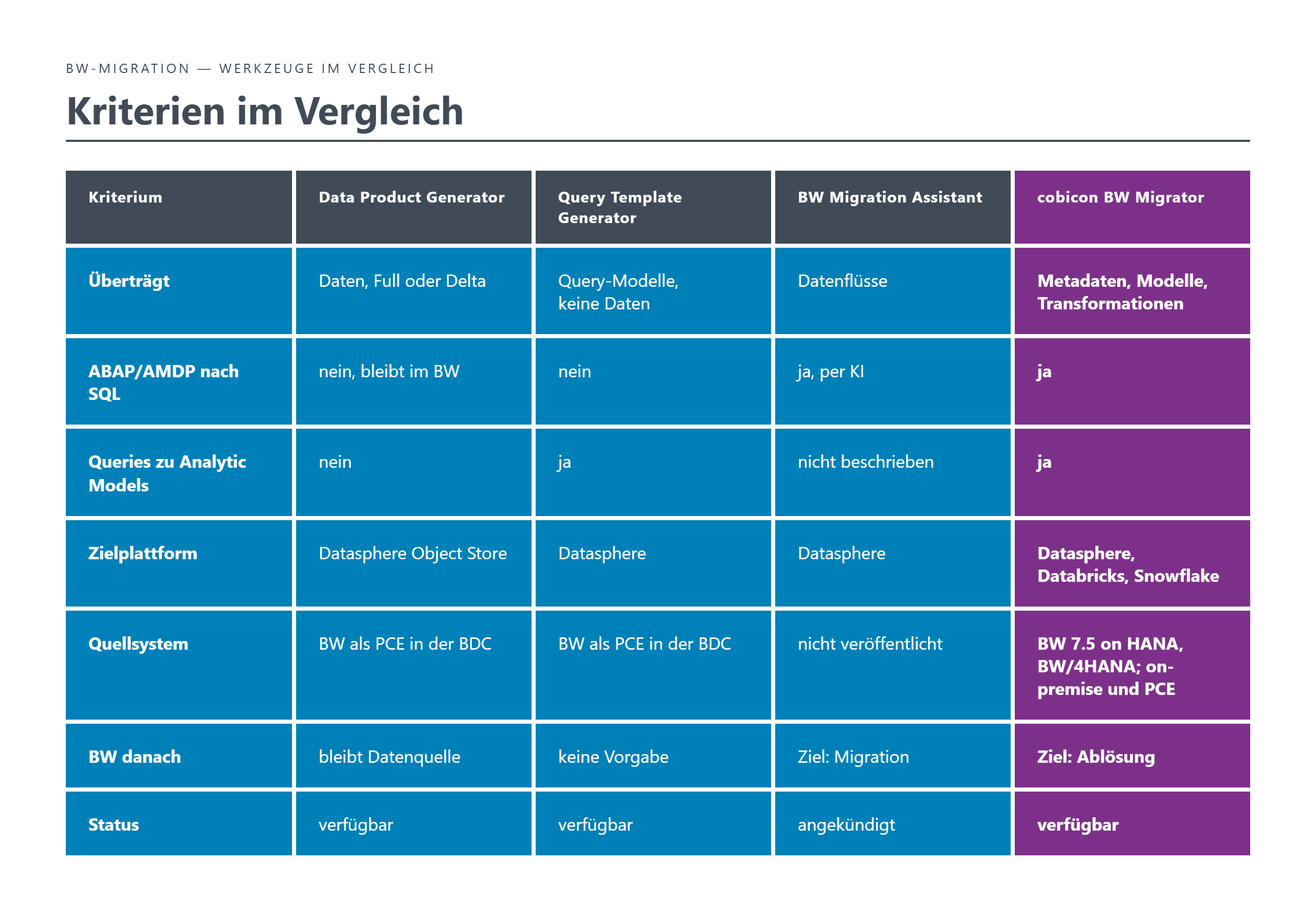
The tools compared
Best practices for your BW modernization
1. Clarify your target state first
Do you want to keep running your BW or replace it? That determines which tools you need.
2. Check the prerequisites early
Release, support package, Private Cloud Edition, and enablement by ticket determine whether and when you can use the DPG and the Query Template Generator.
3. Combine the tools deliberately
Data with the DPG, models and logicmodels, logic, and queries with the cobicon BW Migrator, each tool for its job. If your BW runs in the Private Cloud Edition, the Query Template Generator is also an option for queries.
4. Keep an eye on the SAP roadmap
The BW Migration Assistant and further expansion stages have been announced. Check the status in the SAP Roadmap Explorer before you commit.
Conclusion
Make data available or replace BW: your target state decides.
The Data Product Generator, Query Template Generator, and cobicon BW Migrator are not competitors but tools for different tasks. Only for queries do the Query Template Generator and the BW Migrator overlap.
The DPG brings BW data into Business Data Cloud quickly and with SAP’s support, and makes it usable for Datasphere, analytics, and AI, as long as your BW keeps running. If you want to replace it, you also need a way to handle models, logic, and queries. SAP is announcing the BW Migration Assistant for this and offers the Query Template Generator for queries; with the cobicon BW Migrator, you can cover all three today.
Are you planning the modernization of your BW and wondering which path fits you? Get in touch. We’re pragmatic, collaborative, and hands-on.
Author: Andreas Förger | Last updated: 11/04/2026